VRAC+ (VRAC Plus) Logo Black

VRAC+ - Drumify Any Sound

ひとつの音 – ひとつのドラムキット。

ソースベース

統一感のある

オリジナル

Introductory price:

BEATSURFING summer deals 2026 banner.
BEATSURFING summer deals 2026 mobile banner.

VRAC+ 登場 — 完全なドラミファイ・ソリューション

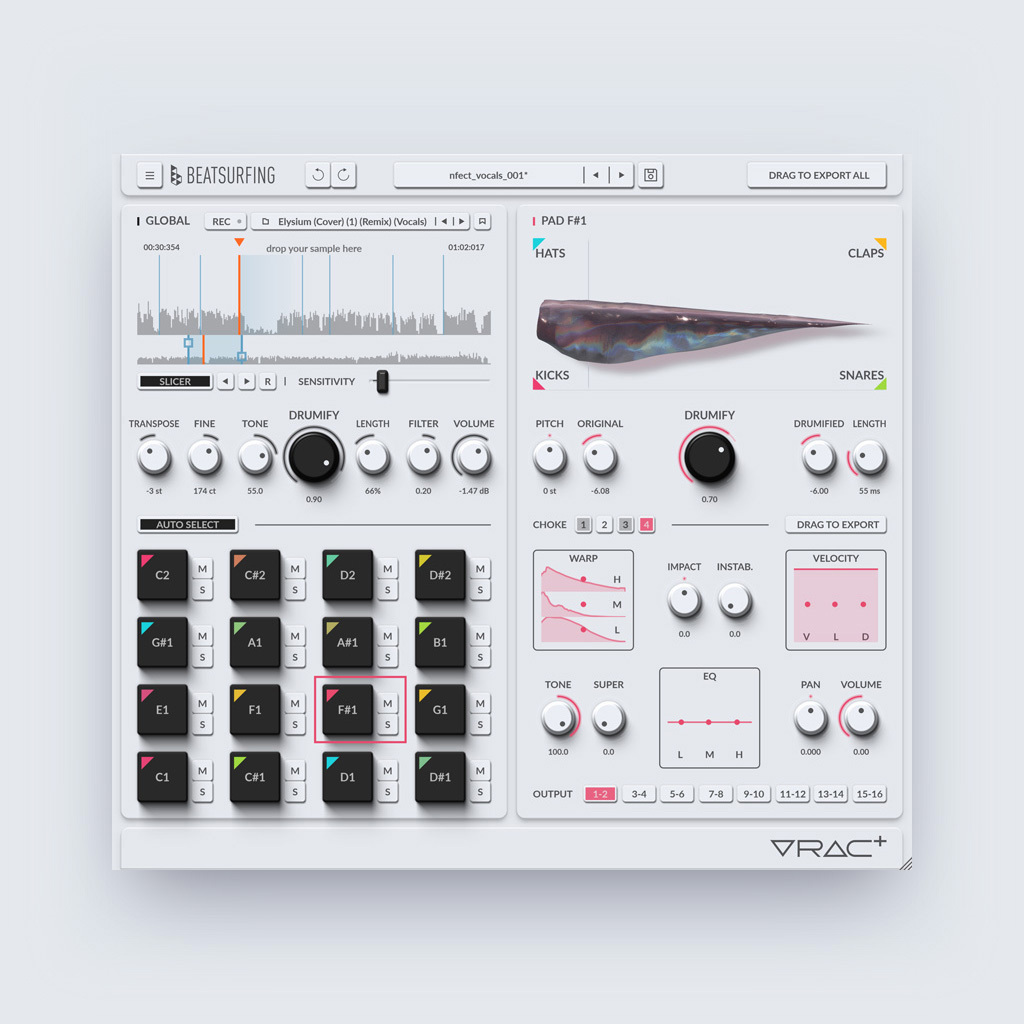
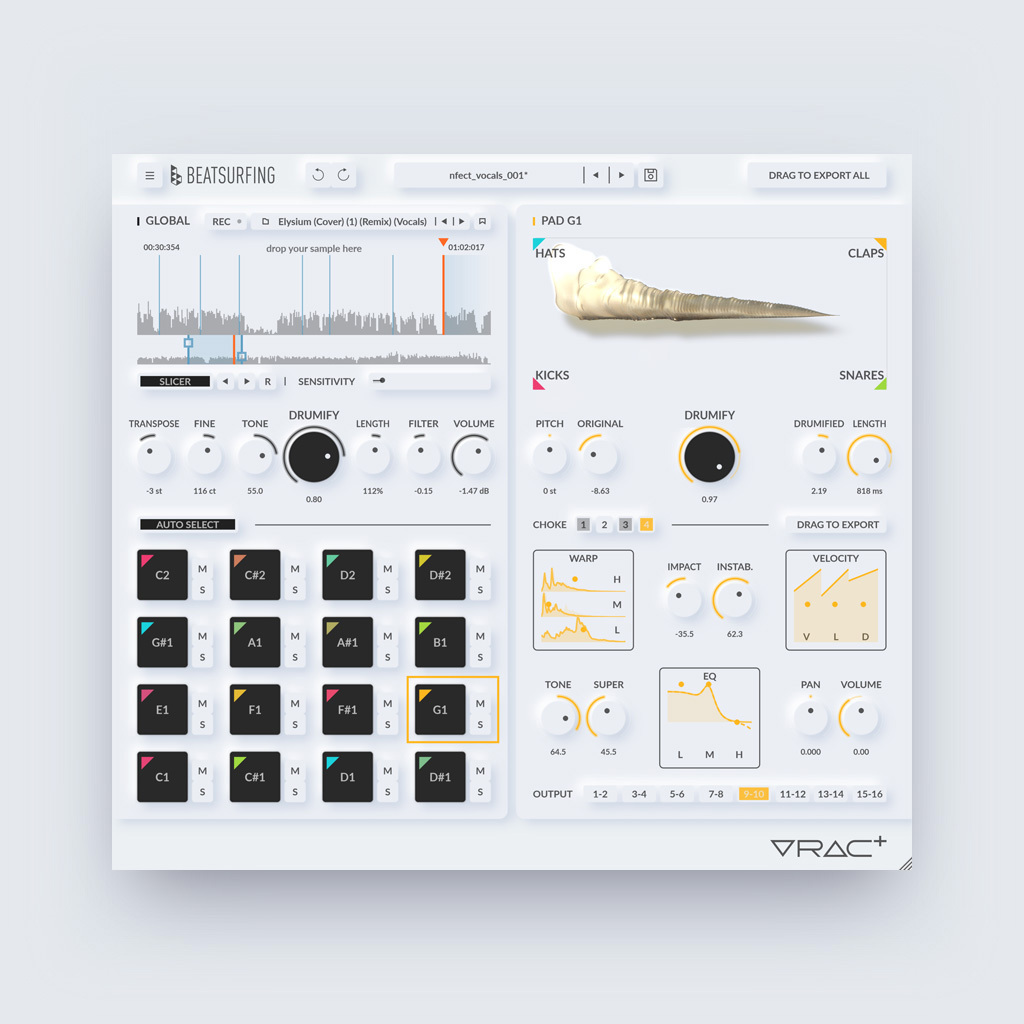
VRAC+ は VRAC と同じ発想を受け継ぎます。どんな音でも読み込めば、ドラムキットが返ってくる。そこに、さらに先へ進むためのフルツールキットが加わります。サンプルを読み込み、オートスライスですべてのヒットを検出。kick、snare、hat、clap モデルのフルバンクをモーフィングしながら、各パッドを作り込めます。

Where VRAC gets you a kit fast, VRAC+ lets you actually design the sound behind it, hit by hit, output by output.

なぜ VRAC+ なのか?

数分でキット完成: サンプル探しの沼にはまることなく、すぐに演奏できるキットへ。
どんな音もドラムに: 未加工のサウンドが、表現力豊かでステージですぐ使える素材に変わります。
モーフィング可能なモデルのフルバンク: kick、snare、hat、clap の間でブレンドし、狙いどおりのキャラクターに仕上げられます。
プリセットだけではない、本物のサウンドデザイン: すべてのモデルの内部に踏み込み、音色、テクスチャー、トランジェント、ダイナミクスを作り変えて、誰が聴いてもあなたのものとわかるキットに。

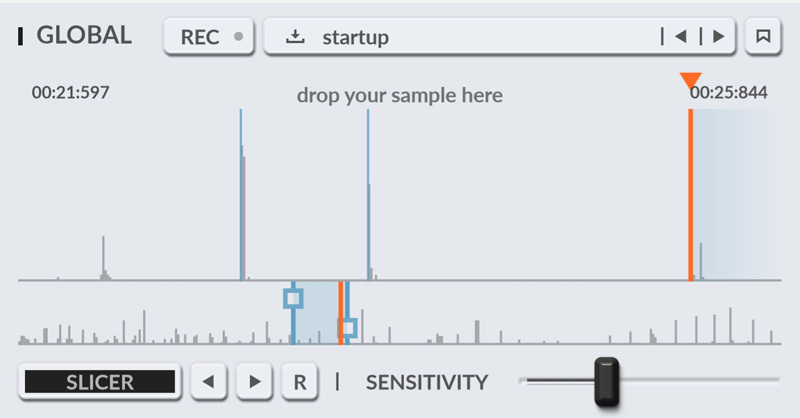
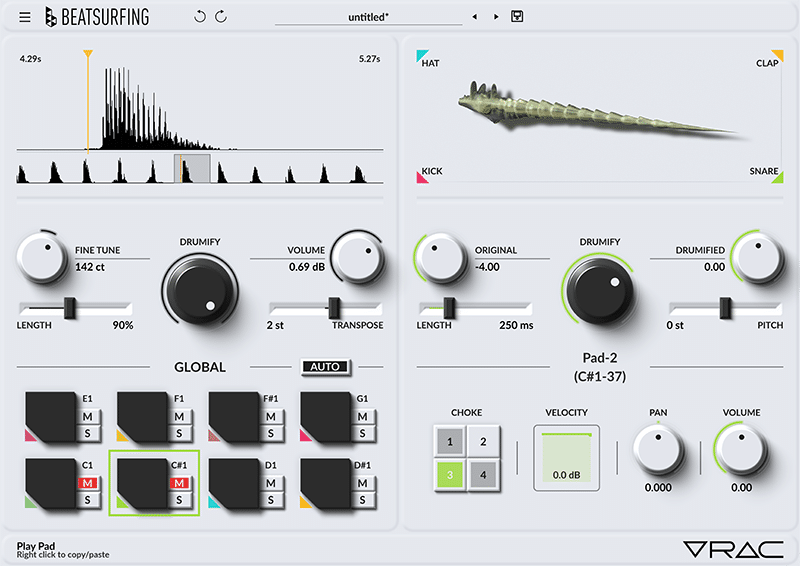
VRAC+ (VRAC Plus) Slicer Close up

主な特徴

どんなサンプルもドラミファイ: 自分の録音、DAW入力、VRAC+ のサンプルライブラリー — どんな音でもキットの種になります。
オートスライシング: スライサーがすべてのパーカッシブな音を検出。感度コントロールで、検出するスライス数を調整できます。
Drumification Models: kick、snare、hat、clap モデルの大規模バンクをモーフィングしながら、すべてのヒットを作り込めます。
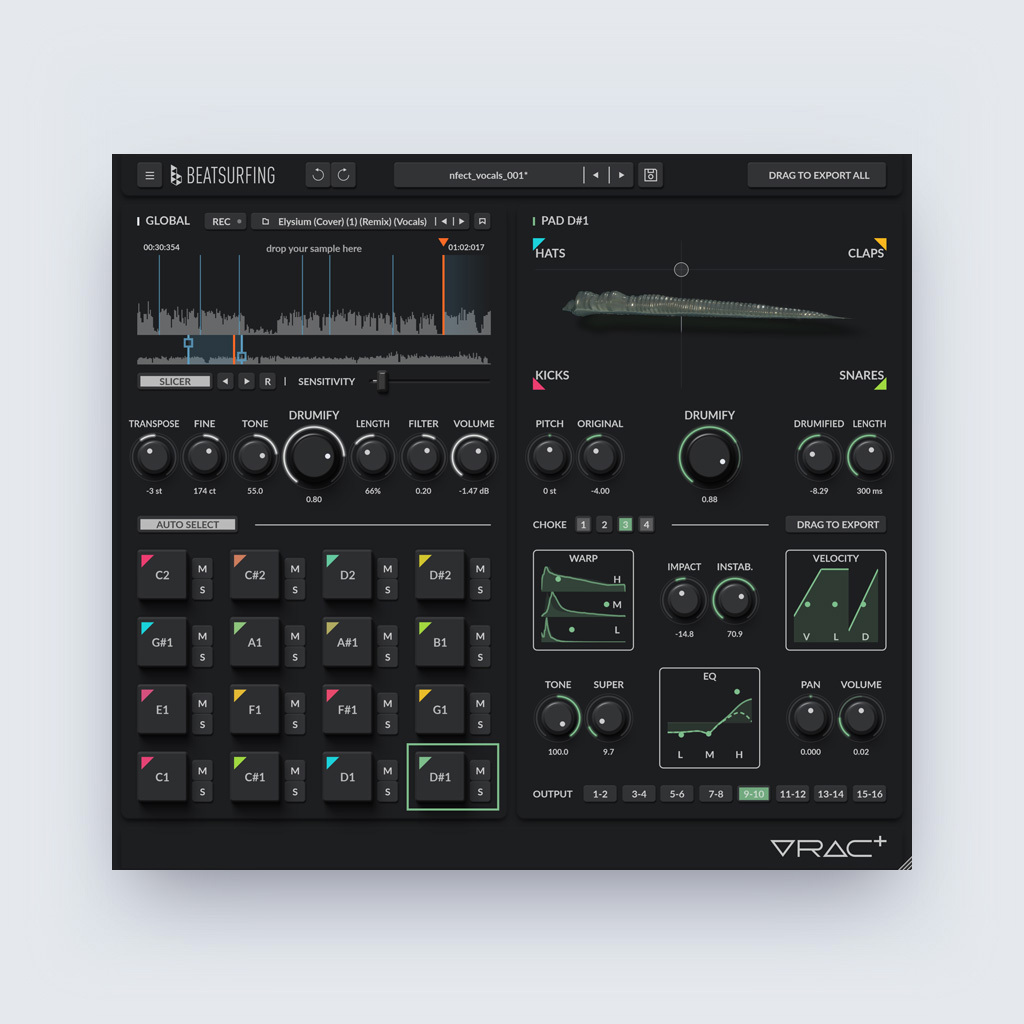
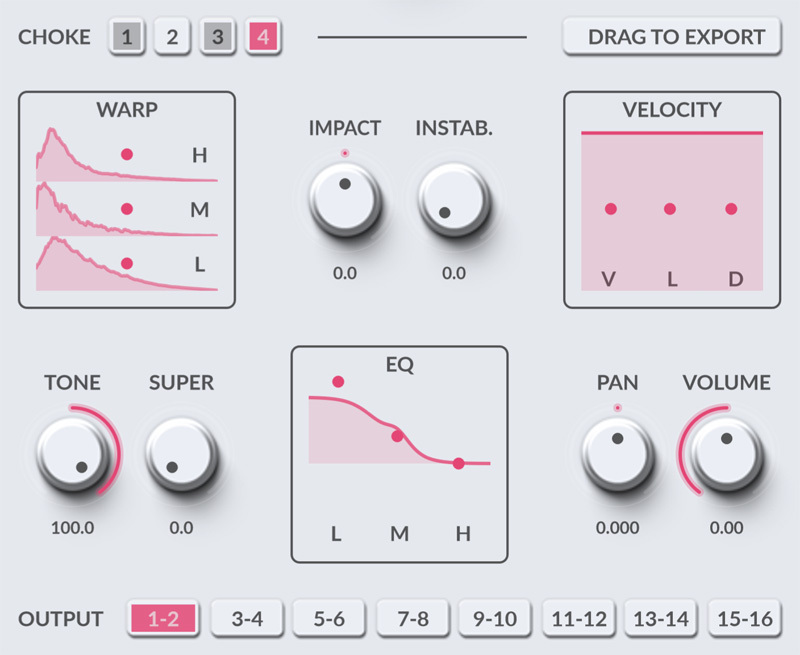
サウンドデザイン・ツール: 各モデルの内部に踏み込み、Warp でダイナミクス・エンベロープを変形させ、Impact でアタック感を整え、Instability で人間らしいばらつきを加え、Tone Shift、Super、EQ で音を仕上げます。
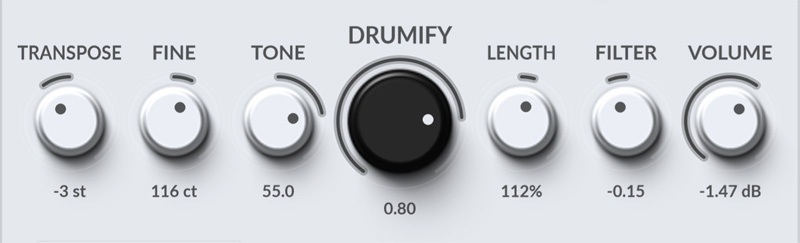
グローバル・シェイピング: キット全体をグローバルな Tone Shift、Filter、Transpose、Volume で一括コントロール。数秒でミックスに使える状態に。

VRAC+ の新機能

VRAC+ 〜の単なる拡張版ではありません VRAC——サウンドの中に深く入り込みたい人のための、より奥行きのある楽器です。VRAC+ ならではのポイントはこちら:

オートスライシング。 サンプルの開始位置を手作業で探す必要はありません。VRAC+ のスライサーがソース内のすべてのトランジェントを検出。あとは矢印キーでヒット間を移動したり、ランダムに選んで新鮮なアイデアを引き出したりできます。

入力録音。 DAWから直接オーディオをキャプチャー。トラックやライブ入力を VRAC+ のサイドチェーン/オーディオ入力にルーティングして、REC を押すだけ。ファイルを何度も書き出す必要はもうありません。録音したテイクは録音済みサンプルフォルダーに直接保存され、すぐにドラミファイできます。

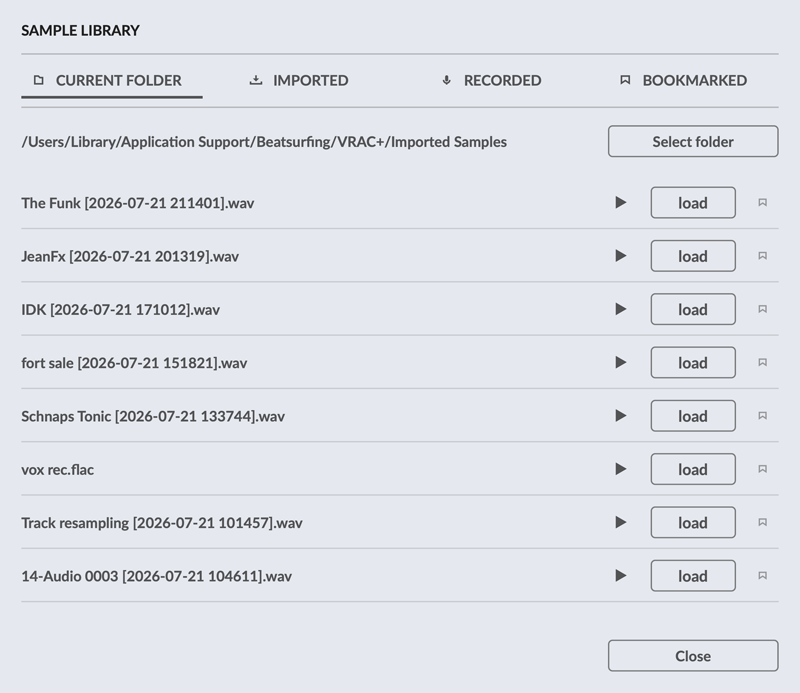
本格的なサンプルライブラリー。 自分のファイルや録音だけでなく、VRAC+ のために専用に録音された厳選サウンドのライブラリーも掘り下げられます。 

16パッド、フルコントロール。 無料版の2倍のパッド数。各パッドに専用のシェイピングツール——Warp、Impact、Instability、Tone Shift、Super、3バンドEQ——を搭載しています。

マルチアウト・ミキシング。 各パッドに専用のステレオ出力ペア(全8系統)を用意。それぞれのドラムを個別のチャンネルに送り、本物のマルチトラックセッションのようにキットをミックスできます。書き出しはドラッグ操作でキット全体を一度に。

VRAC+ (VRAC Plus) Controls close up
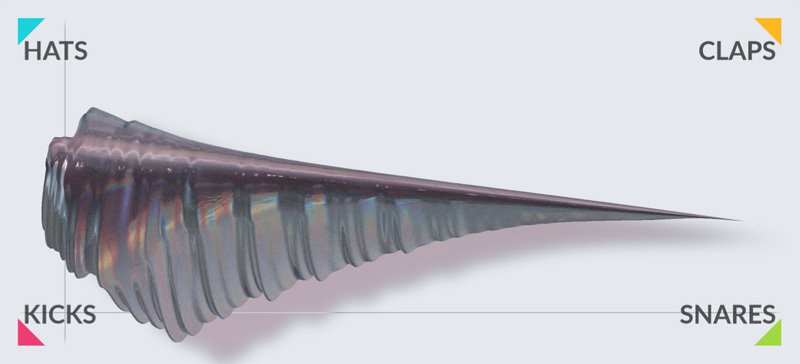
VRAC+ (VRAC Plus) XY Shader close up

パフォーマンスとミキシングのために

〜のすべてのパッドは VRAC+ 本物の楽器のようにトリガー、オートメーション、ミックスができます。任意のパラメーターへの MIDI Learn、Volume・Length・Tone Shift へのベロシティ・マッピング、チョークグループ、パッドやドラミファイ・モデル間での設定のワンクリック複製。

キットが完成したら、 パッド1つだけをドラッグすることも、16パッドのキット全体を一度にドラッグすることもできます——オーディオファイルとして、そのままDAWへ。各パッドは専用のステレオ出力ペアを経由するため、ミキシングの自由度も申し分ありません。

サウンドライブラリー — Olivier Thys とのコラボレーション

Olivier Thys とは20年以上の付き合いになります。VRAC+ の構想を練り始めたとき、答えは明らかでした——彼と一緒にサウンドライブラリーを作るしかない、と。

Olivier is a professional foley artist based in Brussels, and honestly 映画業界でも屈指の存在——300近い作品を手がけ、数々のノミネート、そして最優秀音響賞のマグリット賞を2度受賞。その知識、精度、そして耳のすべてを、このライブラリーに注ぎ込んでくれました。

This library, available in VRAC+, isn’t just a pack of sounds, it’s 本物の映画的クラフトマンシップ、豊かでオーセンティックなテクスチャー——そのまま〜できる プラグイン内でそのまま使い、自由に加工できます。

VRAC+ (VRAC Plus) Library close up
VRAC-UI-SNARE-Faceplate

VRAC からのアップグレードをお考えですか?

すでに VRAC をお使いですか? これまでに作成したプリセットとプリセットパックはすべてそのまま引き継がれます。VRAC+ はネイティブで読み込めますし、VRAC 側で VRAC+ のプリセットを読み込むことも可能です(無料版では詳細設定が無視されるだけです)。乗り換えれば、VRAC で突き当たっていた上限がなくなります。8パッドは16パッドに、1系統のステレオ出力は8ペアに、手動のみだったサンプル開始位置はオートスライシングに、そして固定だったドラミファイのブレンドは本格的なサウンドデザイン・スイート(Warp、Impact、Instability、Tone Shift、Super、3バンドEQ、グローバルフィルター)になります。

VRAC と VRAC+

VRAC は、どんなサンプルからでも手軽にドラムキットを作れる、無料で簡単な方法です。 VRAC+ パフォーマンスと、その背後にあるサウンドデザインの両方に、より深くアクセスできます。以下のリストで、2つのバージョンの違いをご確認ください。

音源

DAWから録音

サンプルライブラリー:現在のフォルダー、インポート済み、録音済み

サンプルをブックマーク

サンプルの長さ

最大60秒

最大60分

録音の長さ

最大2分

サンプル開始位置

感度調整付きオートスライサー

前・次・ランダムのスライスへジャンプ

スライスの追加・移動・削除

パッド

パッド

8

16

Warp:3バンドのダイナミクス・リシェイピング

Impact:トランジェント・シェイピング

Instability:ヒットごとのランダム性

Tone Shift:スペクトル・シフティング

Super:サチュレーションとステレオ幅

3バンドEQ

ベロシティ感度

音量

音量、長さ、Tone Shift

グローバルコントロール

グローバル Tone Shift

グローバルフィルター:DJスタイルのローパス/ハイパス

ミックスとエクスポート

オーディオ出力

ステレオペア×1

ステレオペア×8

ドラッグして一括エクスポート:キット全体を一度に

VRAC と VRAC+

VRAC は、どんなサンプルからでも手軽にドラムキットを作れる、無料で簡単な方法です。 VRAC+ パフォーマンスと、その背後にあるサウンドデザインの両方に、より深くアクセスできます。以下のリストで、2つのバージョンの違いをご確認ください。

VRAC

VRAC+

音源

DAWから録音

サンプルライブラリー:現在のフォルダー、インポート済み、録音済み

サンプルをブックマーク

サンプルの長さ

最大60秒

最大60分

録音の長さ

Up to 2 minutes

サンプル開始位置

感度調整付きオートスライサー

前・次・ランダムのスライスへジャンプ

スライスの追加・移動・削除

パッド

パッド

8

16

Warp:3バンドのダイナミクス・リシェイピング

Impact:トランジェント・シェイピング

Instability:ヒットごとのランダム性

Tone Shift:スペクトル・シフティング

Super:サチュレーションとステレオ幅

3バンドEQ

ベロシティ感度

音量

Volume, Length, Tone

グローバルコントロール

グローバル Tone Shift

グローバルフィルター:DJスタイルのローパス/ハイパス

ミックスとエクスポート

オーディオ出力

ステレオペア×1

ステレオペア×8

ドラッグして一括エクスポート:キット全体を一度に

VRAC+:オリジナルサウンドとドラミファイ後のサウンド — 聴き比べてみてください

「Original」と「Drumified」を切り替えて、VRAC+ がどんな音でも一体感のあるドラムキットに変えてしまう様子を、ぜひ聴き比べてみてください。

ビデオ

VRAC+ プラグインの仕組みを見る

Felid によるウォークスルー

ヒント:オートメーションで意外性を

ほぼすべてのパラメーターを DAW からマッピングできます。サンプル開始位置、Drumify 量、Length、その他あらゆるコントロールをオートメーションすれば、VRAC+ が思いがけない発見をもたらしてくれます。さらにパッドごとに Instability を少し加えれば、決して同じにはならない人間らしい揺らぎが生まれ、キットが生き生きと響きます。実際の動きを聴いてみたいですか? ウォークスルー動画で、開始位置をオートメーションする例をご紹介しています。

VRAC+ の動作環境

Windows

Windows 10 以降

2GHz Pentium IVプロセッサーまたは同等品

最低1.03GBの空き容量が必要です

以下のいずれかの形式のインストゥルメントプラグインをサポートするDAW:

macOS

macOS 10.13 High Sierra以降

Intel もしくはアップルシリコンプロセッサー

最低1.16 GBの空き容量が必要です

以下のいずれかの形式のインストゥルメントプラグインをサポートするDAW:

IMPORTANT-READ CAREFULLY: This End User License Agreement (“EULA”) is a legal agreement between you (either an individual or a single entity) and DRUW Audio srl, also known as BEATSUFINRG (DRUW Audio) for the use of their plugin(s) (“Plugin”). By installing, copying, or otherwise using the Plugin, you agree to be bound by the terms of this EULA. This EULA has no relation to any separate purchase agreement when the Plugin was purchased.

By accepting this Agreement and/or installing or otherwise using the Plugin, you acknowledge that you have read this EULA, understand its terms and conditions, and agree to be bound by such terms and conditions. If you accept this EULA on behalf of a corporation, company, or entity other than an individual, you declare that you are authorized to do so.

1. DEFINITIONS

1.1. “Plugin” means DRUW Audio’s audio software products, bundles, or any other related DRUW Audio products, such as sample packs, frozen beats or loops and any associated documentation.

1.2. “Intellectual Property Rights” means collectively, copyright rights, trademark rights, patent rights, trade secrets, moral rights, rights of publicity, authors’ rights, goodwill, and all other intellectual property rights as may exist now and/or hereafter come into existence and all renewals and extensions thereof, regardless of the territory or jurisdiction.

1.3. “Use” means storing, loading, installing, executing, or displaying the Plugin as intended according to the terms of this EULA.

2. GRANT OF LICENSE

DRUW Audio grants you a non-exclusive, non-transferable license to use the Plugin on three different devices, subject to the terms and conditions of this EULA.

3. INTELLECTUAL PROPERTY RIGHTS

The Plugin and any copies that you make are the intellectual property of DRUW Audio and are protected by copyright laws and international copyright treaties.

You are granted the right to use the Plugin’s Sound Content to create original musical works, sample packs, or drum kits. Any original audio material, musical composition, or sample created using the Plugin is your property, provided that:

  • The resulting work involves significant creative processing or transformation.
  • The Sound Content is not redistributed in its raw or original form.
  • The Sound Content is not used to develop, train, or produce another virtual instrument, sample library, or sound engine.

Example: If you create a drum kit using processed drum sounds from the Plugin, you hold the rights to that kit and may sell it commercially. However, you may not extract the raw sounds and use them as part of another instrument or sample library.

4. RESTRICTIONS

4.1. You may not rent, lease, sublicense, distribute, assign, or otherwise transfer the Plugin or this EULA. You may not copy or modify the Plugin, except as expressly permitted by this EULA. You may not reverse engineer, decompile, or disassemble the Plugin.

4.2. If the Plugin contains or includes audio content such as samples, sound sets, presets, and/or audio loops (“Audio Content”), you may use such Audio Content to create your own original soundtracks for your commercial or non-commercial projects. You may freely broadcast and/or distribute your own soundtracks that were created using the Audio Content. However, you may not distribute the Audio Content on a standalone basis, nor may such Audio Content be repackaged in whole or in part as audio samples, sound libraries, sound effects, music beds, audio plugins, virtual or other music instruments.

5. TRANSFERS

5.1. You may transfer the Plugin by contacting DRUW Audio. The transferee must have an active BEATSURFING account. Your license will automatically terminate upon any transfer of the Plugin. Upon transfer, you must: (i) completely unregister your license from the Plugin. The transferee must accept the terms and conditions of this EULA as a condition to the transfer.

5.2. A license to Use the Plugin for free, as a beta version, or labeled NFR (“Not For Resale”) may not be sold or transferred.

6. SUPPORT AND UPDATES

DRUW Audio may provide support and updates for the Plugin. Support and updates are provided at the sole discretion of DRUW Audio, and DRUW Audio has no obligation to provide support or updates. contact support@beatsurfing.com.

Licensee agrees that it is Licensee’s responsibility to implement Updates in a commercially reasonable time to the extent advised by DRUW Audio. Licensee acknowledges that any losses to the features or functionality of the Plugin due to Licensee’s own delay in implementing any Updates shall be no fault of DRUW Audio.

7. DISCLAIMER OF WARRANTIES

The Plugin is provided “AS IS” without warranty of any kind, either express or implied, including, but not limited to, the implied warranties of merchantability and fitness for a particular purpose. DRUW Audio does not warrant that the functions contained in the Plugin will meet your requirements or that the operation of the Plugin will be uninterrupted or error-free.

8. LIMITATION OF LIABILITY

In no event shall DRUW Audio be liable for any special, incidental, indirect, or consequential damages whatsoever (including, without limitation, damages for loss of business profits, business interruption, loss of business information, or any other pecuniary loss) arising out of the use of or inability to use the Plugin, even if DRUW Audio has been advised of the possibility of such damages.

9. TERMINATION

This EULA will terminate automatically if you fail to comply with any of the terms and conditions of this EULA. Upon termination, you must immediately cease using the Plugin and destroy all copies of the Plugin.

10. GOVERNING LAW

This EULA shall be governed by and construed in accordance with the laws of the city of Liège, Belgium without regard to its conflict of laws provisions.

11. ENTIRE AGREEMENT: 

This EULA constitutes the entire agreement between you and DRUW Audio with respect to the Plugin and supersedes all prior or contemporaneous communications and proposals, whether oral or written, between you and DRUW Audio.

If you have any questions about this EULA, please contact DRUW Audio at support@beatsurfing.com.

By clicking “I agree” or installing or using the Plugin, you acknowledge that you have read this EULA, understand it, and agree to be bound by its terms and conditions.

Latest update: March 12th 2025

よくある質問 (FAQ)

VRAC+ の体験版はご用意していませんが、ライト版として VRAC があります。しかも VRAC は——無料です。

そしてもちろん、いつもどおり、VRAC+ をご購入いただいた場合には、〜をご用意しています 14日間の返金ポリシー。VRAC+ がワークフローに合わないと感じられた場合は、ご購入から14日以内であれば、理由を問わず簡単に返金をご請求いただけます。
次のアドレスまでメールをお送りください: support@beatsurfing.comその際は、私たちが返金手続きをお手伝いします。

As a valued BEATSURFING customer, once you’ve purchased any of our products, you’re automatically enrolled in our Early Bird Program. This means you’ll always be the first to try out our latest plugins and enjoy exclusive discounts before anyone else. The Early Bird program starts ahead of the public release and ends on the day of the public release.

見逃さないようにするために、ぜひ私たちのメール配信に登録してください。そうでないと、限定オファーを逃してしまうかもです!

はい、可能です!当社ではすべてのプラグインに14日間の返金ポリシーを設けています。購入後14日以内にRANDOMの返金をリクエストしていただければ、理由を問わず対応いたします!

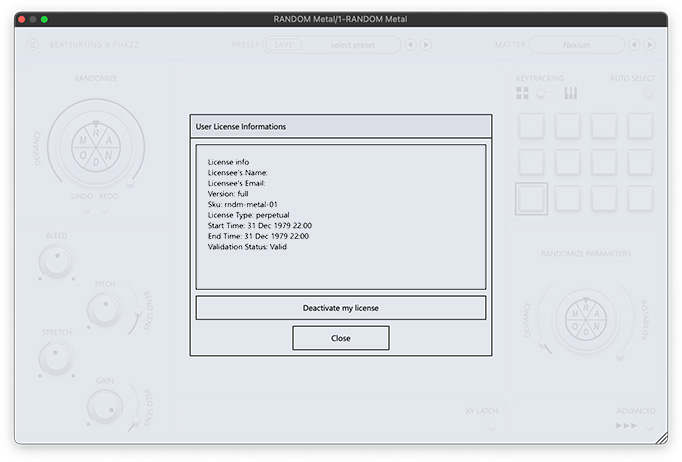
返金リクエストを送信する前に、RANDOMのライセンス登録を解除していることをご確認ください。 VRAC+ のライセンス登録を解除してください。

リクエストを受け取り次第、処理には最大72時間ほどお時間をいただく場合がありますので、ご了承ください。

ご不明な点がございましたら、遠慮なくサポートチームまでお問い合わせください。 サポートチームに連絡する!

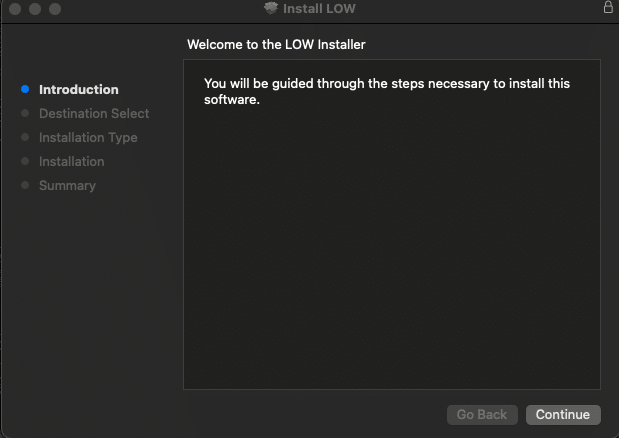
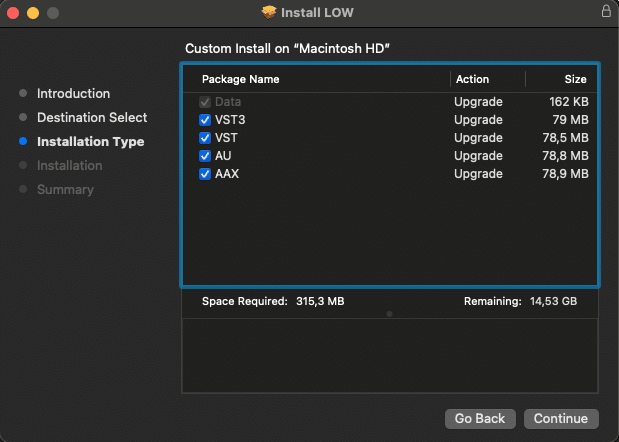
1. BEATSURFING VSTsアカウントからrandom.pkgインストーラーファイルをダウンロードしてください。 BEATSURFING VSTsアカウント ダブルクリックしてインストールプロセスを開始してください。
2.「続ける」をクリック

LOW install for Mac - screen 1

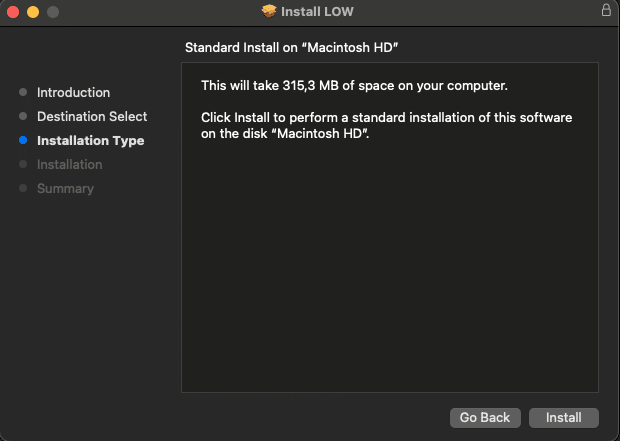
3. インストールするパッケージを選択し、「続ける」をクリックしてください。

LOW install for Mac - screen 2

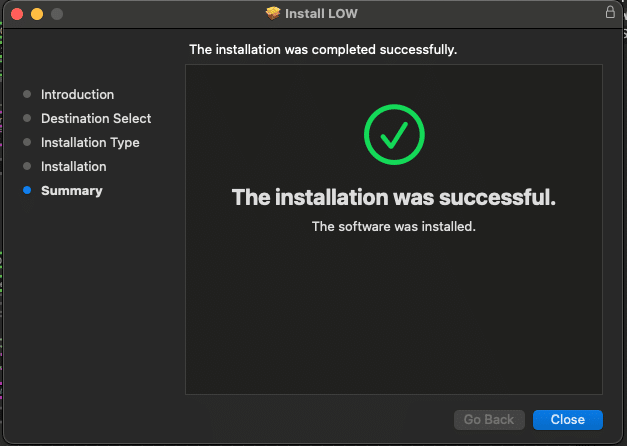
4.「インストール」をクリック

LOW install for Mac - screen 3

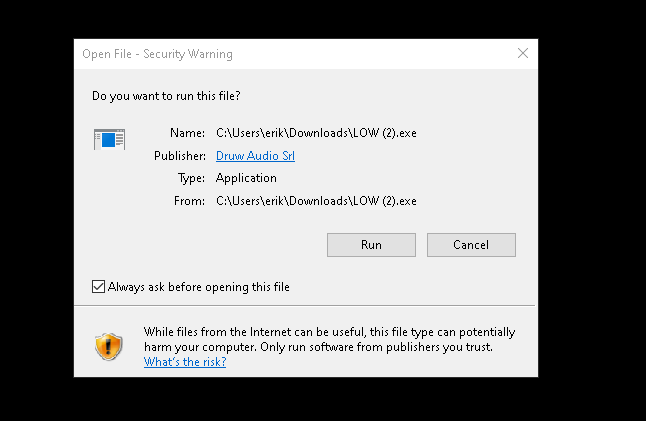
5.「閉じる」をクリックし、コンピュータを再起動してください。

LOW install for Mac - screen 4


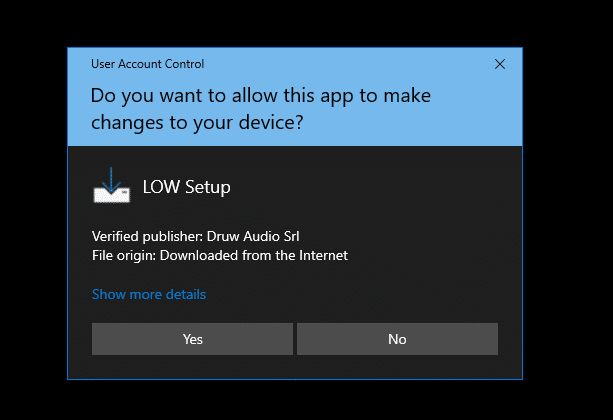
1. Download the zip file and unzip the installer file to a folder of your liking.
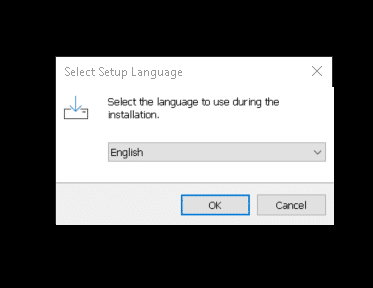
2. インストーラーを開き、インストール中に使用する言語を選択して「OK」をクリックしてください。

LOW install for Windows - screen 1

LOW install for Windows - screen 2

LOW install for Windows - screen 3

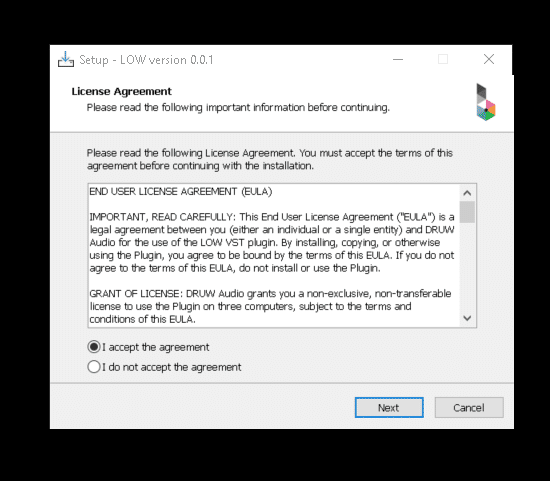
3. 使用許諾契約(英語)をよくお読みの上、同意するかどうかを選択し、「Next」をクリックしてください。

LOW install for Windows - screen 4

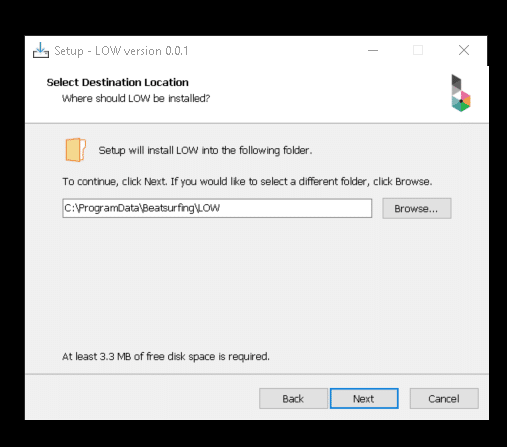
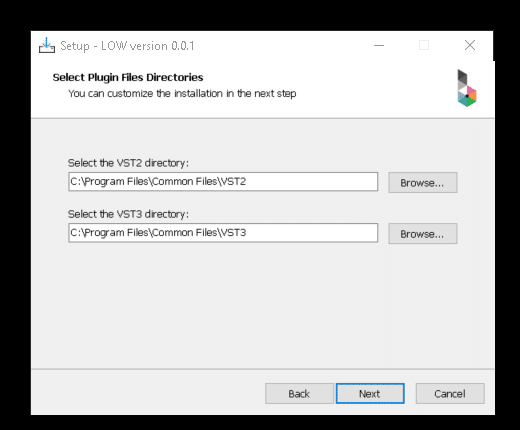
4. VST、VST3、AAXのディレクトリを選択し、「Next」をクリックしてください。

LOW install for Windows - screen 5

LOW install for Windows - screen 6

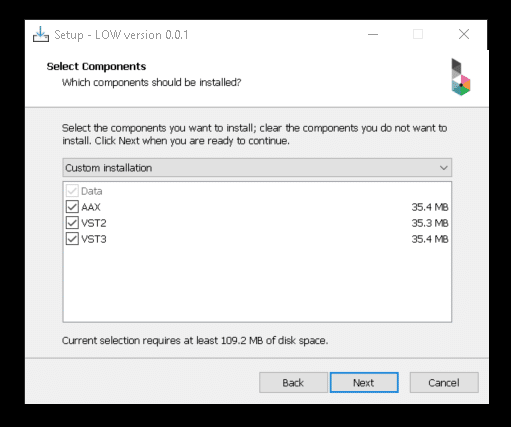
5. インストールしたいコンポーネントを選択し、お使いのマシンに十分な空き容量があることを確認してください。その後、「Next」をクリックします。


LOW install for Windows - screen 7

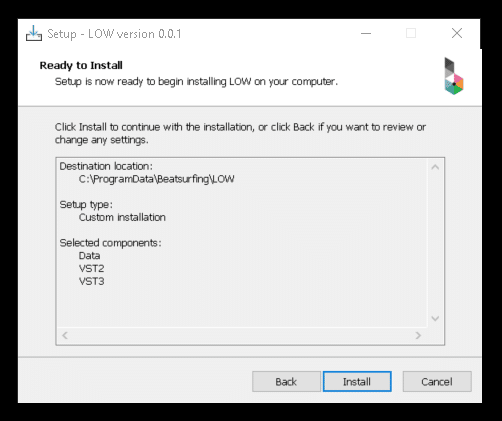
6. 選択内容を確認したら、「Install」をクリックしてください。

LOW install for Windows - screen 8


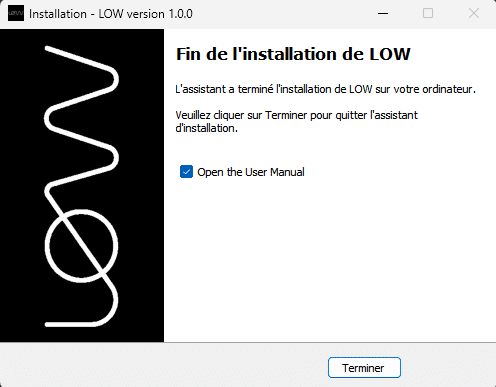
7. セットアップが完了しました。「Finish」をクリックしてウィンドウを閉じてください。

LOW install for Windows - screen 9

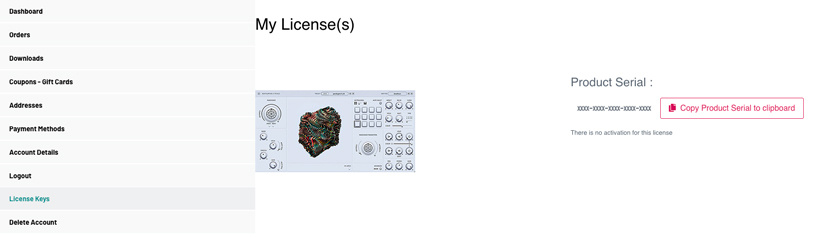
After purchasing VRAC+ your License key appeared on your Licenses page: https://beatsurfing.com/my-license/
注意: 各ライセンスはMac OS またはWindowsのいずれかで 3 デバイスまでアクティベート可能です。

Get RANDOM metal license key in your account on beatsurfing.com

1. ライセンスナンバーをコピーする
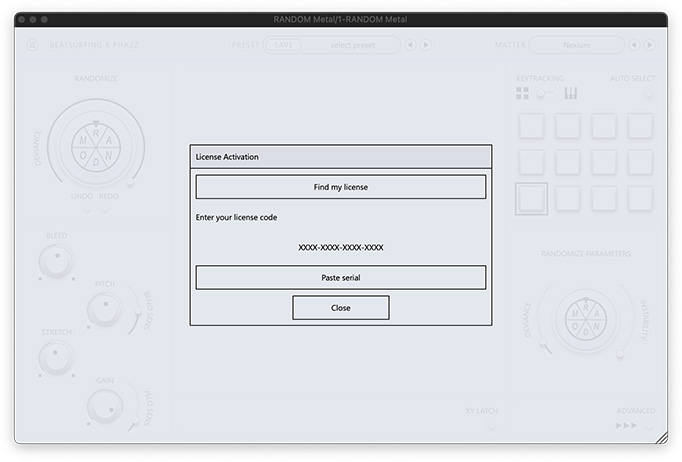
2. Open VRAC from your DAW
3. VSTを起動する際にライセンスキー番号を貼り付けてください。

RANDOM metal installation process - screen 5

RANDOM metal installation process - screen 6


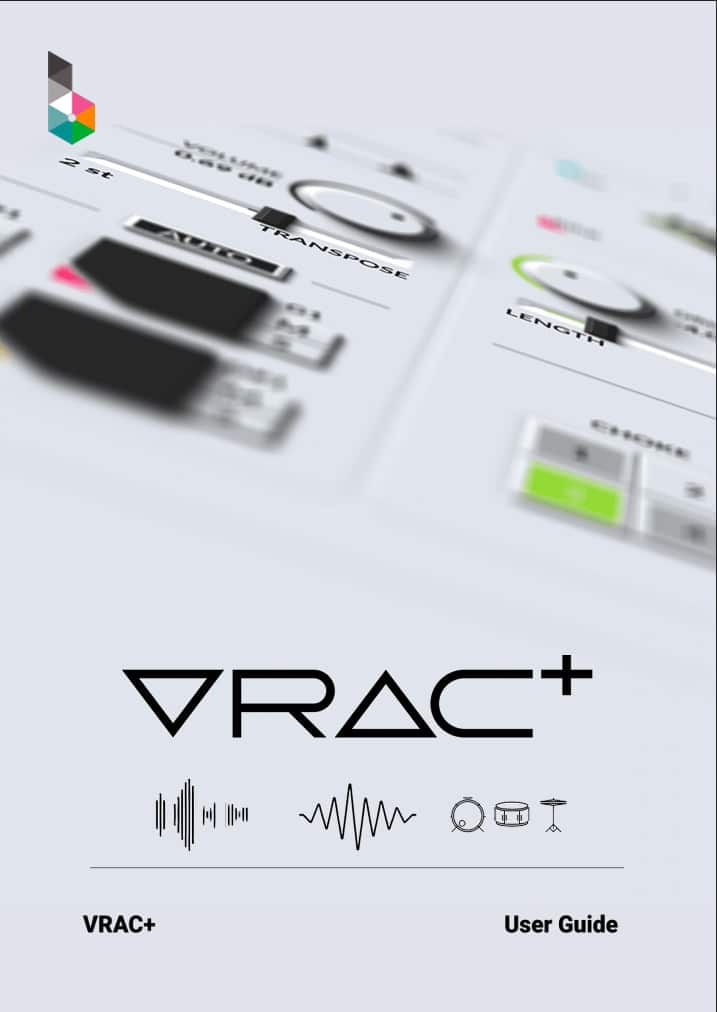
ご質問への回答は、ユーザーガイドでご確認いただけます。 VRAC+ ユーザーガイド PDF.

VRAC+ (VRAC Plus) User Guide cover

お探しの内容が見つかりませんでしたか? ナレッジベースをご確認ください。 それでも回答が見つからない場合は、サポートへメールをお送りください。 support@beatsurfing.com.

お楽しみに!

新製品リリース時にお知らせします。
ニュースレターに登録して、最新情報をお見逃しなく。

Support

Login

Favicon BEATSURFING

Organic Bass sounds at its best

RANDOM Metal Sample Packをどちらにお送りすればよいですか?