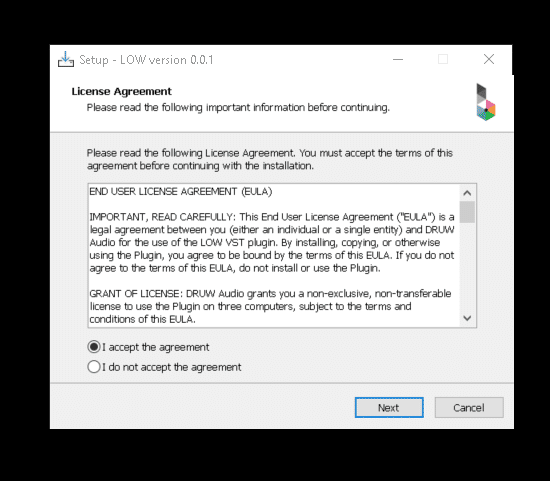
IMPORTANT-READ CAREFULLY: This End User License Agreement (“EULA”) is a legal agreement between you (either an individual or a single entity) and DRUW Audio srl, also known as BEATSUFINRG (DRUW Audio) for the use of their plugin(s) (“Plugin”). By installing, copying, or otherwise using the Plugin, you agree to be bound by the terms of this EULA. This EULA has no relation to any separate purchase agreement when the Plugin was purchased.
By accepting this Agreement and/or installing or otherwise using the Plugin, you acknowledge that you have read this EULA, understand its terms and conditions, and agree to be bound by such terms and conditions. If you accept this EULA on behalf of a corporation, company, or entity other than an individual, you declare that you are authorized to do so.
1. DEFINITIONS
1.1. “Plugin” means DRUW Audio’s audio software products, bundles, or any other related DRUW Audio products, such as sample packs, frozen beats or loops and any associated documentation.
1.2. “Intellectual Property Rights” means collectively, copyright rights, trademark rights, patent rights, trade secrets, moral rights, rights of publicity, authors’ rights, goodwill, and all other intellectual property rights as may exist now and/or hereafter come into existence and all renewals and extensions thereof, regardless of the territory or jurisdiction.
1.3. “Use” means storing, loading, installing, executing, or displaying the Plugin as intended according to the terms of this EULA.
2. GRANT OF LICENSE
DRUW Audio grants you a non-exclusive, non-transferable license to use the Plugin on three different devices, subject to the terms and conditions of this EULA.
3. INTELLECTUAL PROPERTY RIGHTS
The Plugin and any copies that you make are the intellectual property of DRUW Audio and are protected by copyright laws and international copyright treaties.
You are granted the right to use the Plugin’s Sound Content to create original musical works, sample packs, or drum kits. Any original audio material, musical composition, or sample created using the Plugin is your property, provided that:
- The resulting work involves significant creative processing or transformation.
- The Sound Content is not redistributed in its raw or original form.
- The Sound Content is not used to develop, train, or produce another virtual instrument, sample library, or sound engine.
Example: If you create a drum kit using processed drum sounds from the Plugin, you hold the rights to that kit and may sell it commercially. However, you may not extract the raw sounds and use them as part of another instrument or sample library.
4. RESTRICTIONS
4.1. You may not rent, lease, sublicense, distribute, assign, or otherwise transfer the Plugin or this EULA. You may not copy or modify the Plugin, except as expressly permitted by this EULA. You may not reverse engineer, decompile, or disassemble the Plugin.
4.2. If the Plugin contains or includes audio content such as samples, sound sets, presets, and/or audio loops (“Audio Content”), you may use such Audio Content to create your own original soundtracks for your commercial or non-commercial projects. You may freely broadcast and/or distribute your own soundtracks that were created using the Audio Content. However, you may not distribute the Audio Content on a standalone basis, nor may such Audio Content be repackaged in whole or in part as audio samples, sound libraries, sound effects, music beds, audio plugins, virtual or other music instruments.
5. TRANSFERS
5.1. You may transfer the Plugin by contacting DRUW Audio. The transferee must have an active BEATSURFING account. Your license will automatically terminate upon any transfer of the Plugin. Upon transfer, you must: (i) completely unregister your license from the Plugin. The transferee must accept the terms and conditions of this EULA as a condition to the transfer.
5.2. A license to Use the Plugin for free, as a beta version, or labeled NFR (“Not For Resale”) may not be sold or transferred.
6. SUPPORT AND UPDATES
DRUW Audio may provide support and updates for the Plugin. Support and updates are provided at the sole discretion of DRUW Audio, and DRUW Audio has no obligation to provide support or updates. contact support@beatsurfing.com.
Licensee agrees that it is Licensee’s responsibility to implement Updates in a commercially reasonable time to the extent advised by DRUW Audio. Licensee acknowledges that any losses to the features or functionality of the Plugin due to Licensee’s own delay in implementing any Updates shall be no fault of DRUW Audio.
7. DISCLAIMER OF WARRANTIES
The Plugin is provided “AS IS” without warranty of any kind, either express or implied, including, but not limited to, the implied warranties of merchantability and fitness for a particular purpose. DRUW Audio does not warrant that the functions contained in the Plugin will meet your requirements or that the operation of the Plugin will be uninterrupted or error-free.
8. LIMITATION OF LIABILITY
In no event shall DRUW Audio be liable for any special, incidental, indirect, or consequential damages whatsoever (including, without limitation, damages for loss of business profits, business interruption, loss of business information, or any other pecuniary loss) arising out of the use of or inability to use the Plugin, even if DRUW Audio has been advised of the possibility of such damages.
9. TERMINATION
This EULA will terminate automatically if you fail to comply with any of the terms and conditions of this EULA. Upon termination, you must immediately cease using the Plugin and destroy all copies of the Plugin.
10. GOVERNING LAW
This EULA shall be governed by and construed in accordance with the laws of the city of Liège, Belgium without regard to its conflict of laws provisions.
11. ENTIRE AGREEMENT:
This EULA constitutes the entire agreement between you and DRUW Audio with respect to the Plugin and supersedes all prior or contemporaneous communications and proposals, whether oral or written, between you and DRUW Audio.
If you have any questions about this EULA, please contact DRUW Audio at support@beatsurfing.com.
By clicking “I agree” or installing or using the Plugin, you acknowledge that you have read this EULA, understand it, and agree to be bound by its terms and conditions.
Latest update: March 12th 2025





 Login with Google