Help center/RANDOM
User guide
RANDOM
Everything you need to install RANDOM and explore its controls, matter and XY-tables.
Welcome
Meet RANDOM
RANDOM is an audio plugin by BEATSURFING that redefines sound synthesis by giving familiar techniques a unique twist.
Driven by 8 modulated delay lines and two feedback loops, the resonator has dedicated noise and modulation sources, phase modulation, many filters and 6 envelopes.
From out-of-tune metallic flange harmonics for snares to in-tune Karplus-Strong synthesis for powerful 808s, the distortion in RANDOM's feedback loop unlocks a realm of sonic possibilities. On top of that, RANDOM uses neural network principles to navigate across an infinite array of unique sounds.
What RANDOM is not
- Not a sampler
- RANDOM is pure synthesis: no audio samples are involved, so you can't replace samples in the synthesis chain.
- Not an audio effect
- You can't feed it an audio input. It only accepts MIDI input.
- Not a standalone app
- RANDOM is a plugin: you need a DAW (digital audio workstation) to use it, such as Ableton Live, Logic Pro, Reaper, Pro Tools, FL Studio, Cubase or Bitwig.
Where to start
Quick start
System requirements
RANDOM runs as a plugin in your DAW on macOS and Windows.
macOS
- macOS 10.13 High Sierra or later
- Intel or Apple Silicon processor
- A host application that supports 64-bit VST, AudioUnit or AAX
- At least 100 MB free disk space
- Formats: AU, VST, VST3, AAX
Windows
- Windows 7 or later
- 2 GHz Pentium IV processor or equivalent
- A host that supports 32-bit or 64-bit VST
- At least 100 MB free disk space
- Formats: VST, VST3, AAX
Quick start
Installation
Download the installer for your system, run it, then enter your license code the first time you open RANDOM.
macOS
- Download the RANDOM_vX.X.X.pkg installer file.
- Follow the steps to install. The plugins are installed to the default location: /Library/Audio/Plug-Ins.
- On first launch, enter your license code.
Windows
- Download the RANDOM_vX.X.X.exe installer file.
- Install to your preferred plugin folder.
- On first launch, enter your license code.
After purchasing RANDOM, your license key appears on your Licenses page: beatsurfing.com/my-account/license-keys.
Quick start
Activating & deactivating the license
Each license you buy lets you activate the plugin on 3 computers at a time.
If you need to run it on another machine, first deactivate the plugin's license on one of your machines.
When a license is deactivated
Your plugin is still usable, but in a frozen state: your existing sessions will load the plugin and its parameters in their last saved state. However, you won't be able to access the user interface to tweak its parameters.
Using RANDOM
Control knobs
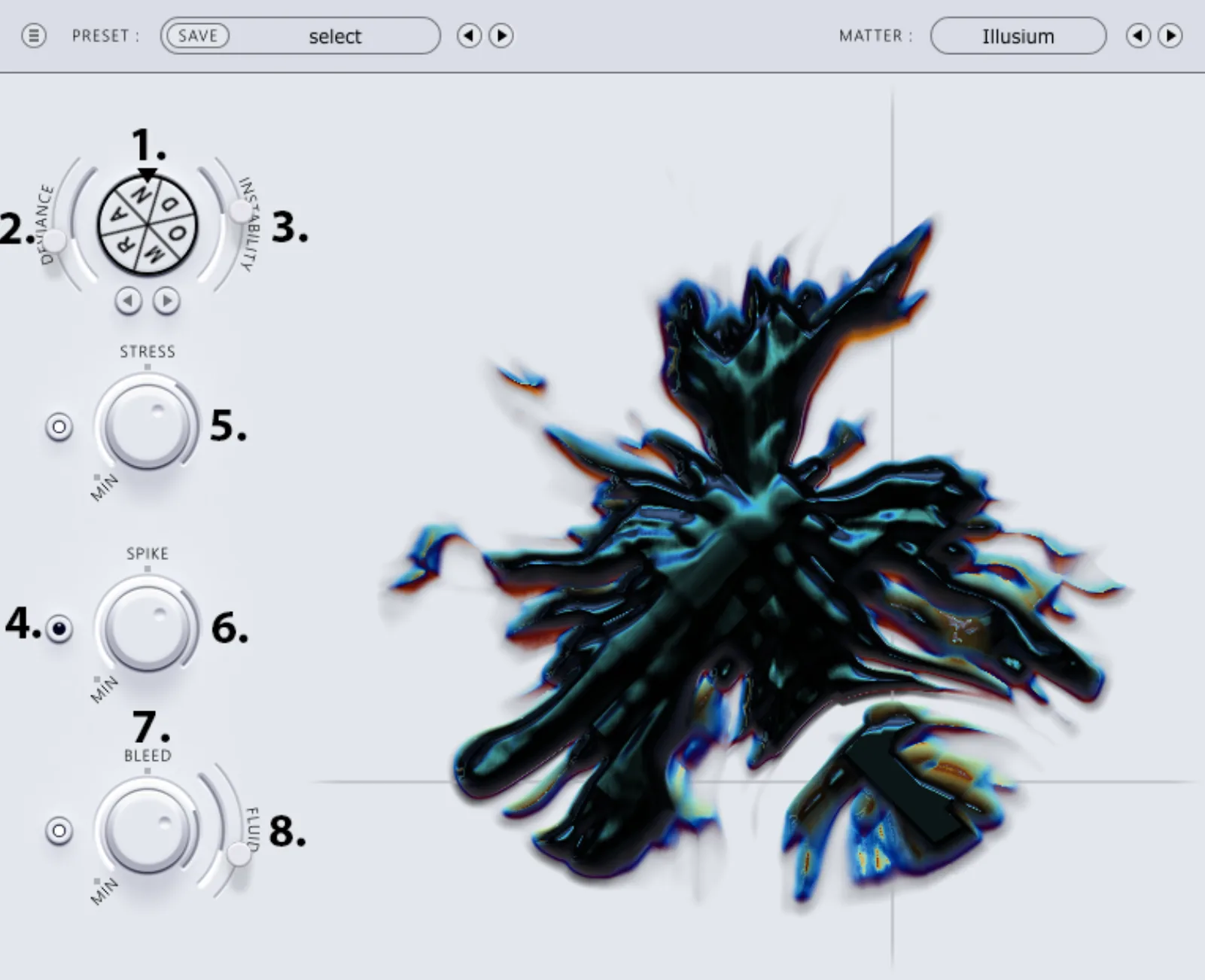
RANDOM gives you a few high-level parameters, deliberately kept unconventional. The numbers match the screenshot.
Randomize
- 1. RANDOM wheel
- Click the wheel to generate a new random variation of the current sound.
- 2. Deviance
- A few hundred parameters can vary greatly. Turn Deviance up and each click on the RANDOM wheel takes your sound matter further away; turn it down and the changes are smaller.
- 3. Instability
- Applies randomness on a per-note basis. At zero, no randomness is applied; above zero, a corresponding amount of randomness is applied to each new note you play.
- 4. Parameter-lock buttons
- Click the button to the left of a knob to lock that parameter: the XY control no longer affects it.
Shape
- 5. Stress
- The more Stress you apply, the longer the synth decays.
- 6. Spike
- Adds aggression to the sound: darker, warmer tones on the left, harsher sounds on the right.
- 7. Bleed
- Sets how much of the resonator you hear.
- 8. Fluid
- Alters the timing of many modulation sources in the Bleed.
Using RANDOM
Matter & XY-table
RANDOM is both nature-inspired and AI-sourced.
The MATTER
The MATTER represents the many hidden synthesis parameters, the audio output and the XY-control input at the same time. It uses the attraction and repulsion of ferrofluid dynamics to display these values.
It's not only a picture of what's happening under the hood: it's also a playful invitation to explore different areas of the XY-table.
MATTER = the visual representation of your current navigation through the XY-table.
The XY-tables
Each table was designed with several sounds that could be facets of the same source, as if made from the same sound matter. After carefully picking the sounds, we assembled them into tables and taught a neural network how to morph between them.
Playing with the XY-table is like exploring a world of carefully crafted sonic matter. When you hit the RANDOM wheel, you evolve away from that initial matter and gradually explore unique variations of it, creating your own new compound.
Help
Support
Can't find your answer in this guide? Everything else is in the BEATSURFING Help center.
Contact us
Thank you for choosing RANDOM. Don't hesitate to reach out with any questions or ideas: send us a message from the Help center.
The BEATSURFING team
 Login with Google